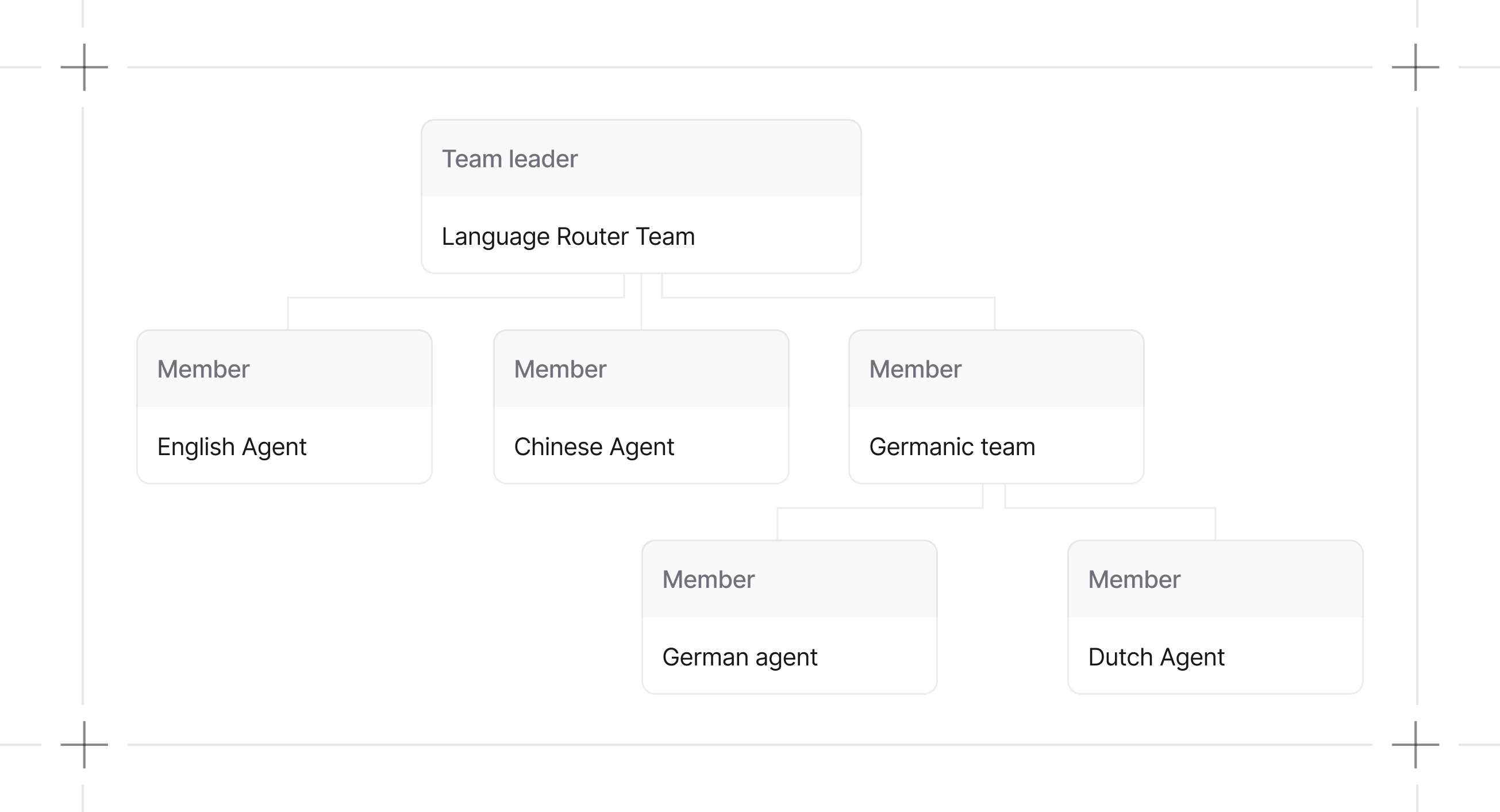
A Team is a collection of agents (or sub-teams) that work together. The team leader delegates tasks to members based on their roles. Team structure
from agno.team import Team
from agno.agent import Agent

team = Team(members=[
    Agent(name="English Agent", role="You answer questions in English"),
    Agent(name="Chinese Agent", role="You answer questions in Chinese"),
    Team(
        name="Germanic Team",
        role="You coordinate the team members to answer questions in German and Dutch",
        members=[
            Agent(name="German Agent", role="You answer questions in German"),
            Agent(name="Dutch Agent", role="You answer questions in Dutch"),
        ],
    ),
])

Why Teams?

Single agents hit limits fast. Context windows fill up, decision-making gets muddy, debugging becomes impossible. Teams distribute work across specialized agents:
BenefitDescription
SpecializationEach agent masters one domain instead of being mediocre at everything
Parallel processingMultiple agents work simultaneously on independent subtasks
MaintainabilityWhen something breaks, you know exactly which agent to fix
ScalabilityAdd capabilities by adding agents, not rewriting everything
The tradeoff: coordination overhead. Agents need to communicate and share state. Get this wrong and you’ve built a more expensive failure mode.

When to Use Teams

Use a team when:
  • A task requires multiple specialized agents with different tools or expertise
  • A single agent’s context window gets exceeded
  • You want each agent focused on a narrow scope
Use a single agent when:
  • The task fits one domain of expertise
  • Minimizing token costs matters
  • You’re not sure yet (start simple, add agents when you hit limits)

Team Capabilities

Modular Execution

Agno agents and teams are modular. Message building, session handling, storage, and background managers are separated into dedicated components for separation of coordination logic with the APIs.

Callable Factories

Pass a function instead of a static list for tools, knowledge, or members. Agno calls it at the start of each run, injecting context based on the function's parameter names.
BehaviorDetails
Injected parametersagent, team, run_context, session_state
CachingCached by custom key > user_id > session_id. Disable with cache_callables=False
Return typesTools and members return a list or tuple. Knowledge returns a KnowledgeProtocol instance or None
knowledge, tools, and members all accept callable factories. Agents also support callable factories for knowledge and tools. See callable factories for examples and caching settings for cache key configuration.

Team Modes

Team 2.0 introduces TeamMode to make collaboration styles explicit. Prefer mode= instead of toggling respond_directly or delegate_to_all_members directly.
from agno.team import Team, TeamMode

team = Team(
    name="Research Team",
    members=[...],
    mode=TeamMode.broadcast,
)
Mode selection controls how the leader collaborates with members. mode overrides legacy flags. If mode is not set, respond_directly=True maps to TeamMode.route, delegate_to_all_members=True maps to TeamMode.broadcast, otherwise TeamMode.coordinate.
ModeConfigurationUse case
Coordinatemode=TeamMode.coordinate (default)Decompose work, delegate to members, synthesize results
Routemode=TeamMode.routeRoute to a single specialist and return their response directly
Broadcastmode=TeamMode.broadcastDelegate the same task to all members and synthesize
Tasksmode=TeamMode.tasksRun a task list loop until the goal is complete
Modes are explicit orchestration patterns. Use them to name and swap coordination topologies without changing agent logic. Team runs can pause for human-in-the-loop requirements and continue after approval. See Delegation for details.

Guides

Build Teams

Define members, roles, and structure.

Run Teams

Execute teams and handle responses.

Debug Teams

Inspect and troubleshoot team behavior.

Resources