

- Chat history. Include previous messages in context for multi-turn conversations.
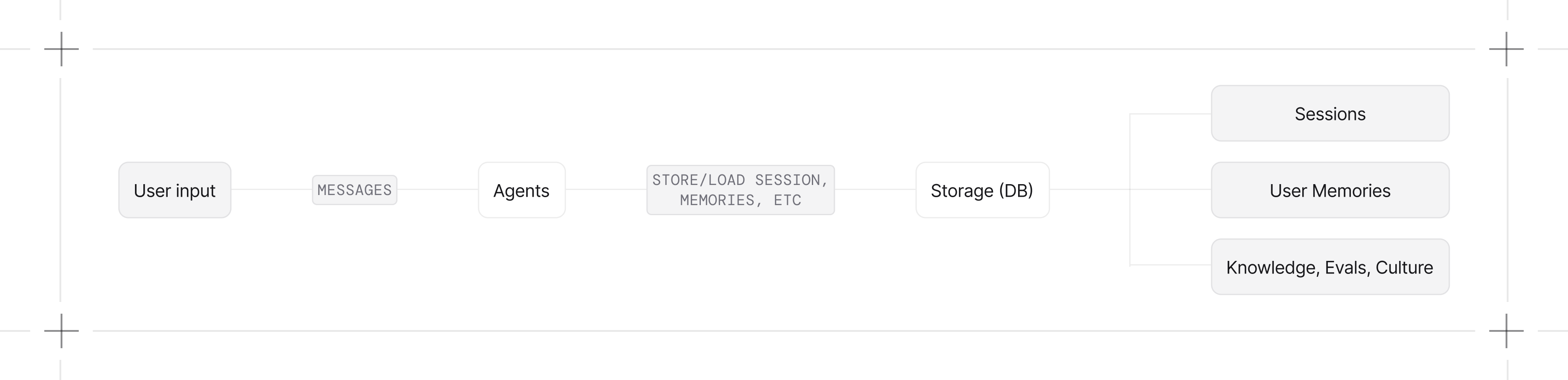
- Session persistence. Store session information and conversation history across requests.
- State management. Store internal agent state across runs. Critical for planning agents.
- Context control. Summarize, compress, enrich, and prune context for better responses.
- Memory and knowledge. Store user-level facts, searchable knowledge, decision traces, and learned insights.
- Tracing and evaluation. Store detailed traces for debugging, monitoring, and building evaluation datasets.
- Data ownership. No third-party dependencies. Query your own database. Build evaluation datasets, extract few-shot examples, flag low-quality responses for review.
Quick Start
Guides
Chat History
Include previous messages in context for multi-turn conversations.
Session Storage
Store and retrieve session data from your database.
Session Summaries
Condense long conversations to manage token costs.
Storage Control
Choose what gets persisted to your database.
Works With Teams and Workflows
Storage works identically across Agents, Teams, and Workflows:Supported Databases
Agno supports 13+ databases for session storage. Use SQLite for development, PostgreSQL for production. View all supported databases.Async Support
For async applications, use the async database classes:Troubleshooting
MissingGreenlet exception
MissingGreenlet exception
You’re using a synchronous engine with an async database class. Use
create_async_engine from sqlalchemy.ext.asyncio.AsyncContextNotStarted exception
AsyncContextNotStarted exception
You’re using an async engine with a synchronous database class. Use
create_engine from sqlalchemy.